Although the Arduino IDE has support for Arduino boards preloaded, the IDE is designed to be extensible and allow the installation and support of other microcontrollers too. Fortunately the procedure is straightforward and fast 💪:
- Make sure that you have the latest version of Arduino IDE installed, you can find it here.
- Start the IDE.
- In the Arduino IDE, from the main menu in the top bar, go to File -> Preferences
- Enter https://dl.espressif.com/dl/package_esp32_index.json into the field "Additional Boards Manager URLs" and then click the OK button. ( Note that if you already have other board URLs entered you can separate them using a comma "," ).

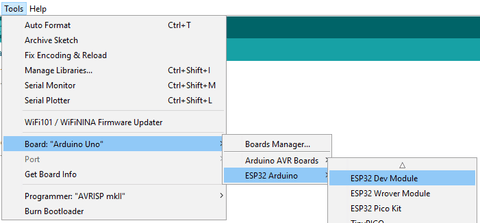
- From the main menu in the top bar, go to Tools -> Board -> Boards Manager

- Search for ESP32, you should find a result by "Espressif Systems", and press the Install button.
- That's it! After a few minutes the support packages will be installed on your PC.
Now you are ready to begin programming your ES32 boards! To verify that the installation was successful, from the main menu in the top bar, go to Tools -> Board. There you should find an ESP32 section that includes support for many ESP32 boards 🚀